Contents
Introduction
This document provides the hardware and software specifications for a Iptor WM1 solution. The requirements are presented with the solution components installed on separate servers. Your specific system configuration though may require multiple components on a single server in one or more instances.
| Note | The minimum requirements represent only what is required to install the software and do not account for customizations or variances in load volumes. You will likely require a faster CPU and more disk space and memory. Consult your Iptor project manager to discuss your specific system needs. |
Server requirements
Database server requirements
The database server supports the configuration and transaction data, along with the stored procedures that contain the business logic of the Iptor WM1 application.
| Specification | Requirement | ||
| Operating System | Windows® Server 2012 | ||
| Minimum CPU | 4 cores | ||
| Minimum Disk Space | 1 GB RAID10, SSD (Solid State Disk) or SVC (SAN Volume Controller)
|
||
| Minimum Memory | 8 GB | ||
| Additional Software | SQL Server® 2012 Enterprise Edition |
Application server requirements
The application server supports:
- Iptor WM1 Compact Application (CAP), which is the interactive user interface for mobile devices, such as radio frequency (RF) devices and tablets. It connects to the database for transactions logging and business logic.
- Print application, which handles the report and label generation.
- Print service, which is configured as a Windows service.
- Integrator files, which are required for communication with host and external systems.
| Specification | Requirement |
| Operating System | Windows Server 2012 |
| Minimum CPU | 3 cores |
| Minimum Disk Space | 1 GB |
| Minimum Memory | 7 GB |
| Additional Software | Microsoft® .NET Framework 4.5 |
Web server requirements
The web server supports Iptor WM1 Web Portal, which provides real-time analytics and dashboards that operators and supervisors access from a web browser to manage their daily activities.
| Specification | Requirement |
| Operating System | Windows Server 2012 |
| Minimum CPU | 3 cores |
| Minimum Disk Space | 1 GB |
| Minimum Memory | 7 GB |
| Additional Software | Microsoft .NET Framework 4.5 IIS (Internet Information Services) |
Client requirements
Desktop client application requirements
The Iptor WM1 desktop client application connects to the database server, executes stored procedures, and interacts with the domain model of Iptor WM1.
| Specification | Requirement |
| Operating System | Windows 7 |
| Minimum CPU | 1 core |
| Minimum Disk Space | 20 GB |
| Minimum Memory | 3 GB |
| Additional Software |
Microsoft .NET Framework 4.0 |
Web browser requirements
You can run Iptor WM1 Web Portal on any web-enabled device using a supported web browser.
Iptor WM1 Web Portal
- Google Chrome
- Internet Explorer 9 or later
- Mozilla Firefox
Supported equipment
RF devices
Iptor WM1 CAP runs on hand-held or vehicle-mounted RF devices that are connected to the application server using remote desktop protocol (RDP). The devices usually include a bar code reader, screen and keypad.
Typical warehouses use RF devices that operate on Windows CE (modern RF handheld terminals come with Windows CE 5 or later installed); however, any iOS or Android™ device with an RDP client can be used with a Iptor WM1 solution.
Voice controllers
Iptor WM1 supports Lucas Systems™ voice-directed solutions for use with RF devices.
Configuration examples
The illustrations in this section show the system configuration, along with sample requirements based on site size.
Example 1: Small site
The following graphic illustrates the functionality provided by each server and application, and shows an example of an optimal configuration for a site in which these metrics apply:
- 2 desktop client users
- 8 voice users or Iptor WM1 CAP users on RF terminals
- Operates 5 days per week
- Open 12 hours per day
- Stores data for 30 days in live database

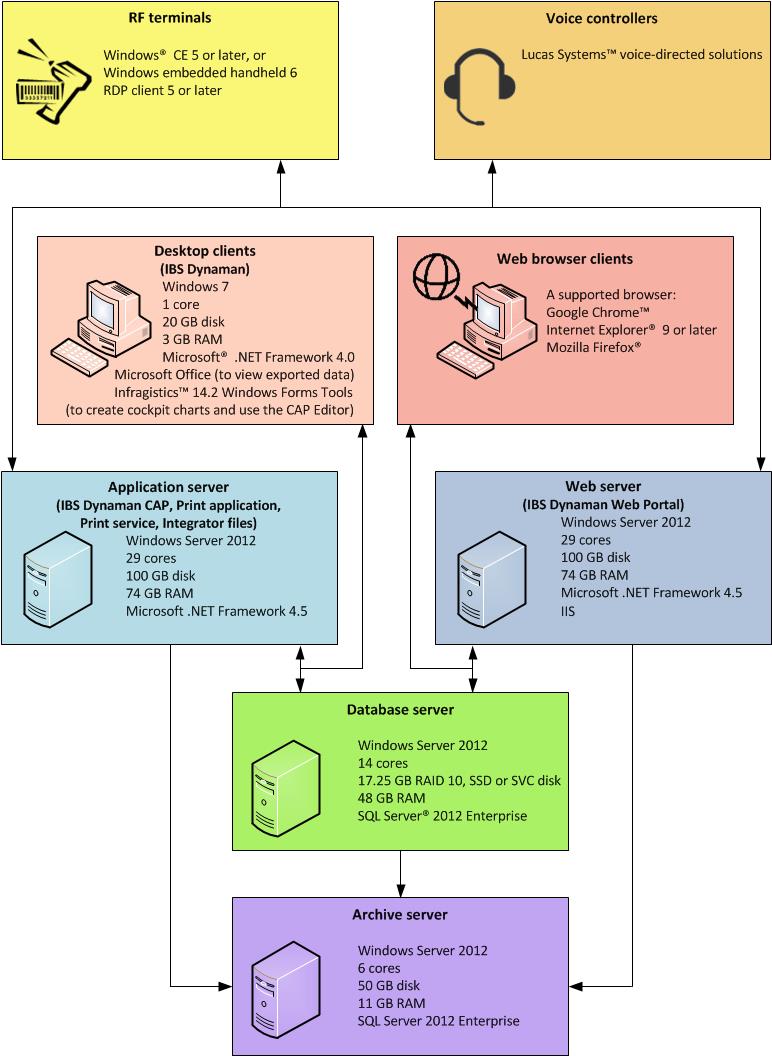
Example 2: Medium site
The following graphic illustrates the functionality provided by each server and application, and shows an example of an optimal configuration for a site in which these metrics apply:
- 5 desktop client users
- 20 voice users or Iptor WM1 CAP users on RF terminals
- Operates 7 days per week
- Open 12 hours per day
- Stores data for 30 days in live database
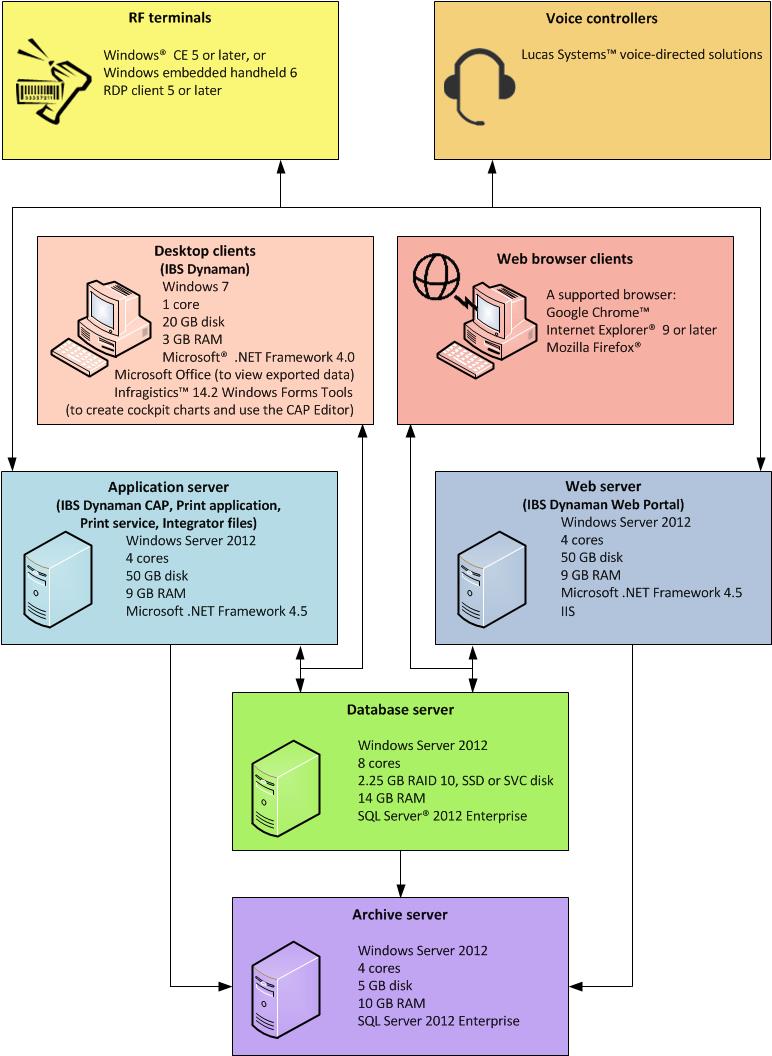
Example 3: Large site
The following graphic illustrates the functionality provided by each server and application, and shows an example of an optimal configuration for a site in which these metrics apply:
- 15 desktop client users
- 35 voice users or Iptor WM1 CAP users on RF terminals
- Operates 7 days per week
- Open 24 hours per day
- Stores data for 30 days in live database
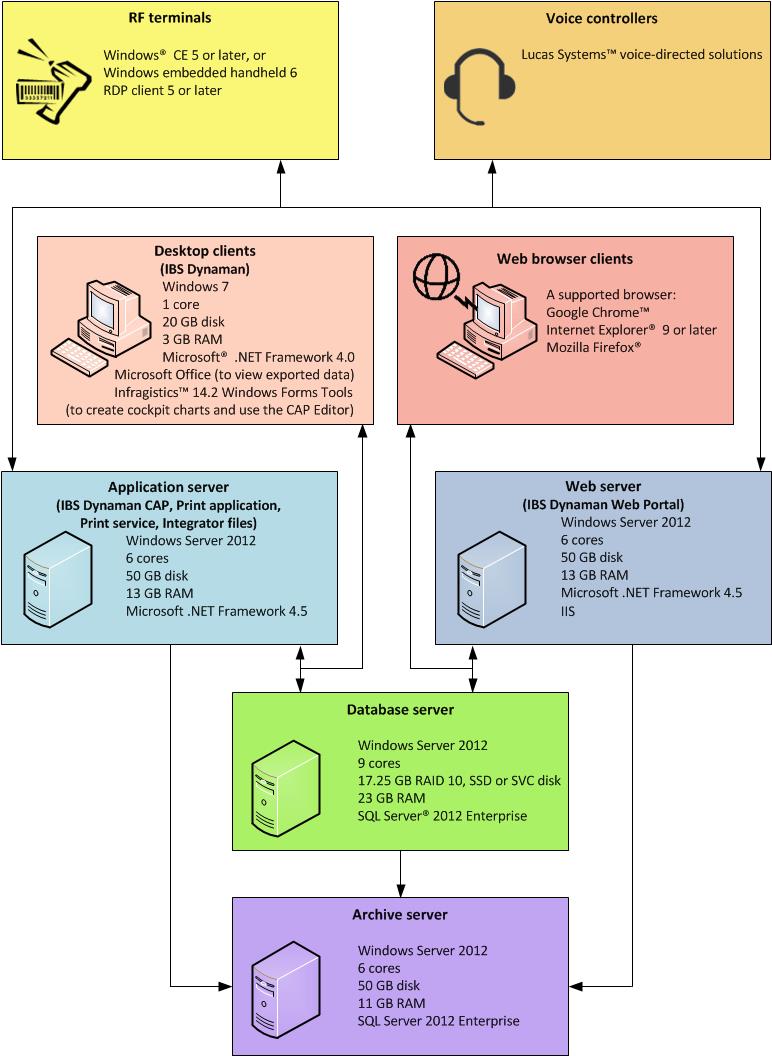
Example 4: Extra large site
The following graphic illustrates the functionality provided by each server and application, and shows an example of an optimal configuration for a site in which these metrics apply:
- 20 desktop client users
- 280 voice users or Iptor WM1 CAP users on RF terminals
- Operates 7 days per week
- Open 24 hours per day
- Stores data for 30 days in live database